

HIPAA-Safe Embedded Maps
for Healthcare Websites
Show clinic locations without Google Maps violations. Fully functional, interactive maps that are HIPAA-compliant.
The Google Maps Embed Problem
Every embedded Google Maps on your healthcare website transmits data to Google servers:
- Visitor IP addresses and device identifiers
- Map interactions (zoom, pan, clicked locations)
- Search queries and route requests
Because you don’t have a BAA with Google Maps (they don’t sign BAAs) these maps are a HIPAA violation.
See Embedded Maps In Action
Go ahead and play with the below example map. It is 100% HIPAA compliant. Feel free to click around the map, try clicking on the cluster pins, see what the filters do, try a search, or click on a location in the left column. The map is highly customizable. Don’t like cluster pins? You can turn them off. Want different pin colors? Not a problem.
Live demo: Try the map above. This is an example of what your visitors could see—no 3rd parties getting data, just fully compliant.
Location Display Without the Risk
Interactive maps, powered by OpenStreetMap tiles, served from HIPAA-compliant servers. And, Sounder signs a BAA with your healthcare organization.
Full-Featured Maps
- Fully customizable
- Zoom and pan
- Mobile friendly
- Multiple locations
- Custom map styling
- Compliant driving directions
- Left-column directory
Zero Third-Party Data Sharing
- Map tiles hosted on Sounder’s HIPAA-compliant servers
- No Google/external API calls
- IP address & fingerprinting data never logged
Easy Location Management Options
Sounder Maps has three simple ways to manage your locations and their information:

Sounder Portal
Log in to our portal to manage your map locations simply and securely online.

WordPress Plugin
Manage locations conveniently in the backend of your WordPress.

Google Sheets
Manage your locations in a Google Sheet—one row per location.
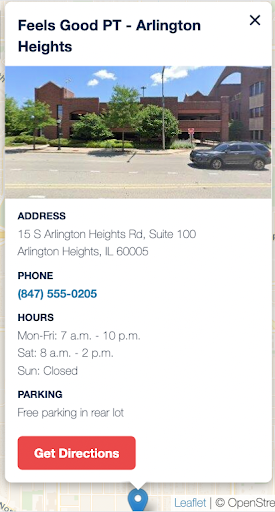
Customizable Location Info Bubbles
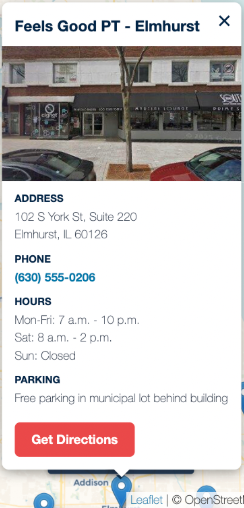
The popup information bubbles are completely customizable. The most common pieces of information include:
- Location photos
- Address, phone/fax numbers, email address
- Days and hours of operation
- Services provided and healthcare providers at the location
- Parking & entrance info, including handicapped access details
- Public transit (bus numbers, train/tram stations)
- “Get Directions” button that links to Google or Apple Maps
- Local landmarks and special amenities
“Get Directions” Feature
Sounder Maps’ Get Directions button links to Google Maps because approximately 70% of Americans use Google Maps for driving directions. When your patients are using their phone and tap on the Get Directions button, their Google Maps app will open and provide them directions to your location.
This system is HIPAA compliant because the button takes them off of your website to a Google app or webpage to receive the information. The link code contains rel=”noreferrer” which instructs the browser to hide the source URL from the destination website, so no PHI is passed.
*Apple Maps is also an option
Simple Migration
Migration from your existing system, or setting up an interactive map for the first time, generally takes about three weeks. The Sounder team will guide you through the steps:
- Complete our onboarding form and decide which information you want to display
- Collect your data
- Decide on image use (if applicable)
- Connect the Sounder team with your web team
- The Sounder team takes care of everything else
Customization Options
Your maps can be customized in several ways:
- Several map styles to choose from—the most popular looks like Google’s maps
- Map pins can be nearly any color, as long as they contrast enough for accessibility
- “Get Directions” button color can be customized within accessibility rules
Location Photo Options
You have the option of having a location image in the popup info bubble. The images can get there in one of two ways:
- You provide an image of each location hosted on the cloud (Dropbox, Google Drive, Azure Storage, etc.)
- We can program Sounder Maps to use a Google Street View image of the location. Be aware however, automated—images can range from perfect short of your front door, to the side of a delivery van.
Note: There is not a mix of your images and Street View. It has to be one or the other, or a location can have no image.

Pricing
Sounder’s pricing is simple and public:

Embedded Maps
$130/month + setup fee
- Easily embeds compliant maps on any website
- Replaces non-compliant Google or Apple Maps
- Manage your location data using Sounder Portal, a WordPress plugin, or Google Sheets
- Customizable popup info: address, phone, location photo, hours, parking, etc.
- Customizable pins
- Signed BAA
Frequently Asked Questions
Does Sounder Maps work on mobile?
Yes, Sounder Maps are fully responsive and touch-optimized. Patients can pan, zoom, and tap to call—all from their phone. The map automatically adapts to screen size.
Does Sounder sign a BAA for the Map solution?
Yes. We have our own BAA you can review, or we are open to reviewing and redlining your BAA. Getting to an agreement on a BAA is generally the most difficult part of signing up to work with Sounder, so if you want us to sign your BAA, share it with us as early in the process as possible.
Do we still need our Google My Business (GMB) profile?
Most definitely! Sounder Maps only replaces the embedded maps on your website. You will still need to maintain your GMB profiles so people can find you in their Google Maps searches.
Can patients still get turn-by-turn driving directions?
Yes. When patients click “Get Directions” on your Sounder Map, it opens Google Maps (the app or in a browser) with the target location already entered. The click on the Sounder Map does not pass the referring website’s information (the HTML code includes rel=”noreferrer”), so no PHI is passed to Google.
Is Sounder Maps accessible?
Yes, the Maps solution has been specifically designed and coded to be fully accessible.
What if we have 50+ locations that change frequently?
This is why we developed three ways to easily manage your locations: our portal, a plugin for your WordPress website, or even the ease of editing a Google Sheet. Your operations team updates any of these systems and your website updates automatically. If you have a system for managing many locations, we can explore connecting that system to Sounder Maps.
Can a filter be applied to locations?
Yes, any data field can be used to filter the locations that show up on the map. Examples include services provided at a location, open now, accepting patients, zip codes, cities, etc.
Does Sounder Maps work on all CMSs?
Yes, Sounder Maps can work on all types of websites. For WordPress, it is a simple short code. For other platforms, embed code is added to the pages with the map. Most CMSs make this easy to do. Here is an example of the embed code:
<div data-pilot-map
  data-json="https://sounderdata.com/wp-json/sounder-maps/v1/locations/feels-good-pt-map"
  data-brand-color="#3b26a6"
  data-sidebar="true"
  data-search="true"
  data-cluster="true"
  data-zoom="10"
  data-popup-fields="address,phone,hours,services,accepting_new_patients"
  data-directions="google"
  style="height:600px;"></div>
<script src="https://maps.sounderdata.com/v1/pilot-maps.js"></script>
Can we self-host this entirely on our own servers?
For Enterprise customers, we can discuss it. It’s possible to deploy Sounder Maps on your infrastructure with complete data sovereignty. Most clients use our HIPAA-compliant hosted solution, but we can support on-premise deployment for organizations with strict data residency requirements.
What if we need to add, edit, or delete locations after launch?
Easy—we give you three ways to maintain your location information: our portal, a plugin for your WordPress website, or even a Google Sheet. Add, delete, or edit the information and the site will update immediately. No developer needed.
Can we track how many people use the map?
No, we do not provide any data on use of the maps. However, if your Analytics is set up well, you will be able to see how many people request directions or even click on a location.
We understand Mapbox and Apple Maps offer a BAA. Should we use those instead?
Both of these platforms offer BAAs, but only for enterprise organizations. Implementation requires technical expertise and ongoing maintenance. Also consider: Apple Maps embeds don’t work well on non-Apple devices (statistically, more than 50% of your visitors). Sounder Maps works identically across all devices and browsers.
Can’t we just use static map images instead of interactive maps?
Yes, you can! Static images don’t transmit data to third parties, unless they are clickable. Then you just have to make sure to add rel=”noreferrer” to the link’s code. You do lose functionality: searchable locations, filters, zooming, panning, clustering, etc. For one location showing “here’s where we are,” a static image works great. For health systems with multiple locations, interactive maps are extremely powerful for the patient experience.

Ready to Make Your Website Compliant?
Start with a free website scan, or book a demo to see how Sounder can solve your compliance challenges.

Sounder Solutions and Prices For HIPAA Compliance

Starting at $935/month

$550/month

$225/hour

$225/month for 1,000 pages